Pages

Contains of the freeware, demo, shareware, Music , Vidio and Movie. programs to download in several categories. Also features latest updates and most popular downloads.

Showing posts with label Remote Control. Show all posts

Windows Media Center - Remote Control - 0.7 Betav0.70

• Summary: Control Windows Media Center using your Windows Mobile phone!
• Requirements:
-Windows Vista or 7 - editions with Windows Media Center
-VMC Controller
-Wifi, Bluetooth/USB activesync connection
-Windows Mobile 6.x Pro, (may work on older versions)
-480x800 (WVGA), 240x320 (QVGA) screen resolution
-.NETCFv3.5 installed on handset
» Windows Media Center - Description
Developer: Mike Debney
Web Site: http://forum.xda-developers.com/showthread.php?t=617849

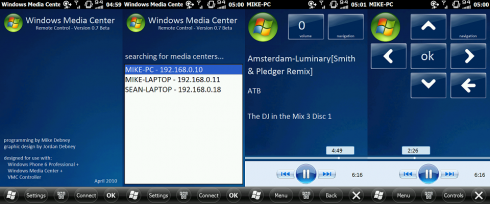
Because there seems to be no simple, functional and easy to use remote control for windows media center on windows mobile devices out there, I've decided to build my own. The software uses VMC Controller to connect to Windows Media Center, enabling basic control of the following functions, as well as displaying media info (see screenshots below):
-menu navigation
-play/pause, next/previous, skip/rewind
-volume control
-playback position seeking
-tv channel up/down
-entering text for searching through media lists

As its still in the beta stage, there will be bugs, so i need testers to trial it on their handsets, providing feedback and suggestions. This latest release adds automatic listing of PCs which are running Windows Media Center with VMC Controller installed, as well as better QVGA support. Support for media extenders and disabling sleep mode are still in development, and may be included in a future release
FOR INSTRUCTIONS, SUPPORT AND DOWNLOADS:
http://forum.xda-developers.com/showthread.php?p=5358611
READ MORE - Windows Media Center - Remote Control - 0.7 Betav0.70

MobiMouse – Remotely Control a Windows PC with your BlackBerry

  • Sumary: Remotely Control a Windows PC with your BlackBerry.
  • license: freeware
  • System Requirements: BlackBerry OS 4.5 or Greater (4.5.0.80 for WiFi)  Windows 7, Vista, XP or 2K w/ .NET Framework 2.0+ BlackBerry desktop software or USB drivers for USB Built in bluetooth or bluetooth Adapter for Bluetooth WiFi enabled PC & BlackBerry on a WLAN for WiFi Data plan & port forwarding for mobile connection
~MobiMouse Description
Mobimouse allows you to control the Windows cursor with your BlackBerry trackball or the touchpad on your BlackBerry Storm.Mobimouse supports full use of the BlackBerry keyboard. You can type on your Blackberry it will show up in whatever Windows application your are currently using.

Features
- Use Arrow Mode to simulate pressing Arrow Keys
- Adjust the Backlight Brightness and Timeout
- Assign Windows Apps & Shortcuts to Convenience Keys
- Options to Hibernate, Suspend or Logoff the PC
- Wired or Wireless Control
- Move the cursor with the trackball or touch screen
- Control Windows Wave Volume
- Escape key to right click
- Works with USB, Bluetooth or WiFi
- Support most Windows Bluetooth Stacks
- Works with Windows 32 & 64 bit systems

Note: You must install both the BlackBerry and Windows clients.

Source: http://java-phones.com
~Download Now
READ MORE - MobiMouse – Remotely Control a Windows PC with your BlackBerry

Windows Media Center - Remote Control

• Summary: The software uses VMC Controller to connect to Windows Media Center, enabling basic control of the following functions, as well as displaying media info
• Requirements: Windows Mobile Pocket PC 5 , 6 , 6.1
.NET Compact Framework 3.5
-Windows Vista or 7 - editions with Windows Media Center.
-VMC Controller.
-Wifi, Bluetooth/USB activesync connection.

» Windows Media Center - Remote Control Description

Made by: Mike Debney

Because there seems to be no simple, functional and easy to use remote control for windows media center on windows mobile devices out there, I've decided to build my own. The software uses VMC Controller to connect to Windows Media Center, enabling basic control of the following functions, as well as displaying media info (see screenshots below):

-menu navigation
-play/pause, next/previous
-volume control
-playback position seek
-tv channel up/down

As its still in the beta stage, there will be bugs, so i need testers to trial it on their handsets, providing feedback and suggestions. This latest release adds support for handsets such as the HD2, and others that are WVGA without directional buttons. Support for media extenders and QWERTY keyboard text input for handsets such as the Xperia are in development, and may be included in a future release.

FILES:
VMC Controller (ive found these builds to be most stable, however others might work too):
Windows Vista users:
http://vmccontroller.codeplex.com/releases/view/23251
Windows 7 users:
http://vmccontroller.codeplex.com/releases/view/34386
READ MORE - Windows Media Center - Remote Control

Recent Comments

Statistic

Followers